LEGO Minifigure Scanner: How to Identify and Price Any Minifig in 2026
"LEGO minifigure scanner" is one of the most-searched LEGO tool queries — about 47,000 monthly searches across the variants ("scan lego minifigures", "lego minifig scanner app", "minifigure scanner"). The reason it keeps getting searched is that the term itself is ambiguous. Half the people typing it want to know what's in a sealed Collectible Minifigure blind bag before they buy it. The other half want to point their phone at a minifig they already own and find out whether it's worth $5 or $4,000.
Those are two completely different products. The apps that solve them are different. The data they pull from is different. And picking the wrong one wastes 20 minutes before you realise you downloaded the thing that doesn't do what you actually need.
This guide walks both. We review the 5 best scanner apps as of 2026, explain what actually drives minifig value, list the top 5 most valuable minifigures ever (with current sealed market prices), and show the exact 4-step process for turning a scan into a real sale-ready price quote.
Two types of "minifigure scanner" — pick the right one first
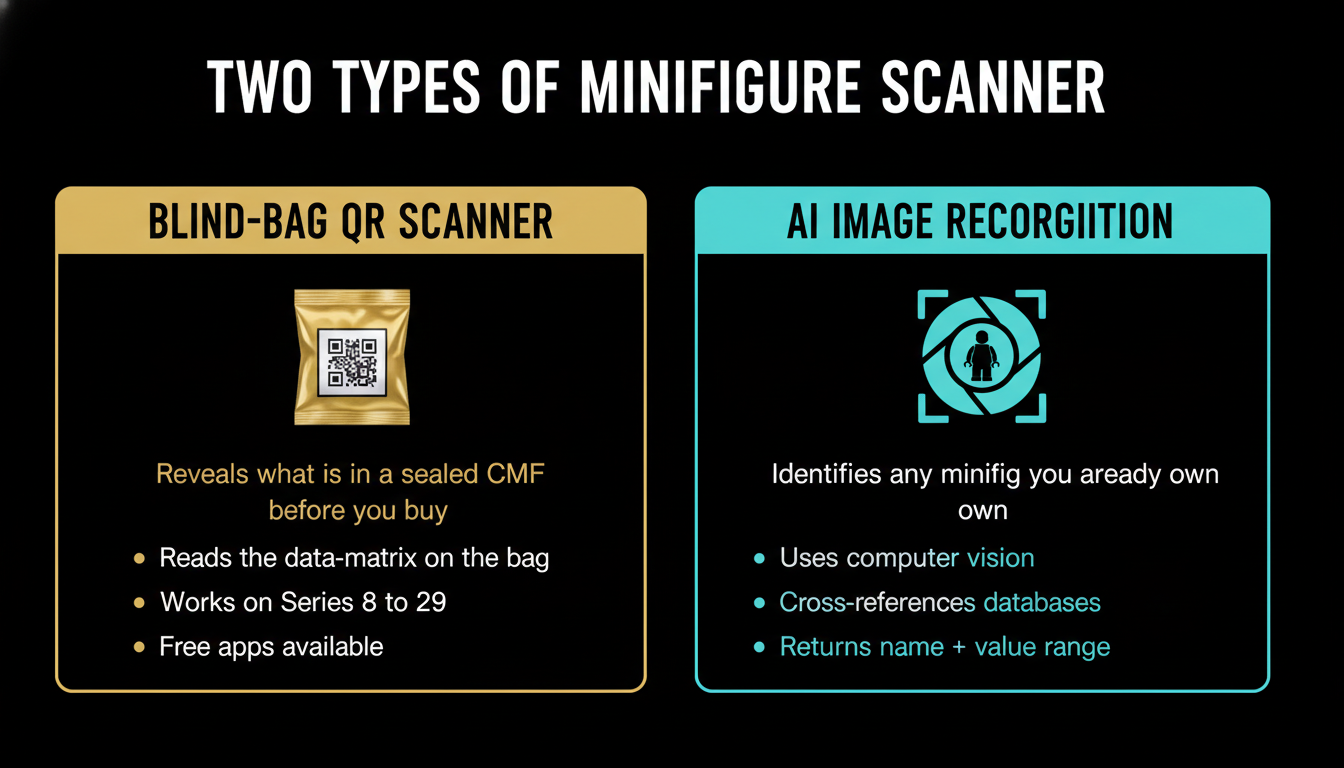
The first thing to know is whether you want a blind-bag QR scanner or an AI image recognition scanner. They share a name and a market, but they do nothing alike.
Blind-bag QR scanner
LEGO's Collectible Minifigures (CMF) series — the ~$5 foil polybags — have a small data-matrix code printed on the bag. From Series 8 onward (roughly 2012), that code uniquely identifies the figure inside. A QR scanner app reads the code and tells you which of the 12 (or 16, depending on series) figures is in that specific bag. You walk into a Walmart, scan a bin of 36 polybags, and pick out the rare $25 figure instead of going home with three duplicate fishermen.
Use this if: you collect the CMF series, you want to find the rare chase figure (~1-in-36 odds), and you can't tell figures apart by feel through the bag.
Best apps for this: Minifig Scan (free, iOS + Android), Brick Search / LEGO Minifig Scan, and Jay's Brick Blog's free web scanner (no install required — supports up to Series 29).
AI image recognition scanner
The other category points your phone's camera at an unbagged, assembled minifigure and uses computer vision to identify it — torso print, headgear, accessories — then cross-references against a database of 12,000+ released figures and pulls a current market value.
Use this if: you bought a collection at a garage sale, inherited Grandma's bin from the attic, or are trying to figure out whether the weird gold-coloured Bilbo Baggins your cousin gave you is worth $5 or $15,000.
Best apps for this: Brickify, Instabrick. Both use AI part recognition. Neither is perfect — accuracy drops on heavily-modified or assembled-from-parts figures — but they save hours of manually flipping through BrickLink searching by torso pattern.
How the CMF blind-bag scanner actually works
The data-matrix code on the polybag is a printed grid of small squares — visually similar to a QR code but more information-dense. LEGO encodes the SKU plus a per-figure identifier. Each scanner app maintains its own mapping table of code → figure name, refreshed every time a new series ships.
Three things to know before you depend on a CMF scanner:
Pre-Series 8 bags don't have unique codes. Series 1 through 7 were originally identifiable by feeling the bag (the famous "feel test"). The data-matrix only became reliable from Series 8 onward.
LEGO has occasionally re-randomized the code mapping mid-run. Most notoriously around Series 11 and 19. When that happens, scanner apps go briefly wrong until the maintainers re-map. If you scan an unreleased or just-released series, double-check the result against a second app.
Some recent series use QR codes instead of data-matrix. Series 25 and later moved to standard QR for accessibility. Most apps support both, but generic barcode-scanner apps will read the QR and return a useless URL — you need a LEGO-specific app to translate the code to a figure name.
The free apps are perfectly adequate. Paying for a CMF scanner is almost never justified — the underlying database is the same public mapping. What you're paying for in the paid versions is collection-tracking features, not better scanning.
The 5 best LEGO minifigure scanner apps in 2026 — honest comparison
Minifig Scan — free, iOS + Android
The dominant free CMF blind-bag scanner. Supports Series 8 through 29 (the latest at time of writing), updates within days of each new series release, no account required, no ads. The 3.0 release in early 2025 added a built-in collection tracker so you can mark which figures you already own and avoid duplicates.
What it does well: fast scanning (under a second per bag), full series coverage, free with no paywall.
What it doesn't: zero image-recognition for already-opened figures, no value lookup, no portfolio export.
Who it's for: pure CMF collectors who buy at retail and want the rare figure without rolling the dice.
Brick Search / LEGO Minifig Scan — free, iOS + Android
The Apple App Store calls it "LEGO Minifig Scan: BrickSearch". Same product. Adds LEGO.com rewards on top of the scan feature — you scan, then click through to LEGO.com to buy the next series, and Brick Search collects the affiliate commission. Functionally equivalent to Minifig Scan for blind-bag identification.
What it does well: clean UI, integrated marketplace, supports the same series range.
What it doesn't: the rewards programme is regional (US/EU strong, weaker elsewhere) and the affiliate links can feel pushy.
Who it's for: collectors who buy from LEGO.com directly and want the rewards-stacking.
Jay's Brick Blog scanner — free, web-based, no install
The smartest "no install" option. Jay's Brick Blog runs a browser-based scanner that works on any phone with a camera and a modern browser. Supports up to Series 29. No app permissions, no battery drain from a background app you'll use four times a year.
What it does well: zero install, no app-store gatekeeping, works on any platform.
What it doesn't: no offline mode (you need data signal in the store), no collection tracking.
Who it's for: occasional CMF buyers who don't want another app cluttering their home screen.
Brickify — paid, iOS + Android
The most-marketed AI image-recognition scanner of 2026. Point the phone at a built minifigure and it returns the name, set of origin, and a value range. Database covers about 12,000 released figures. Accuracy is around 85% on standard figures and drops sharply on minifigs that have been modified, assembled from spare parts, or photographed in poor light.
What it does well: AI recognition that works on a clean photo of a normal figure, integrated value lookup, collection management.
What it doesn't: subscription cost (~$5/month or $30/year), accuracy degrades on edge cases, no QR / data-matrix support for sealed bags.
Who it's for: investors and resellers who acquire bulk collections and need to triage them fast.
Instabrick — paid, web + iOS
AI recognition focused on full collection identification, not just minifigures. Point a camera at a bin of mixed parts and figures and it identifies everything in frame — useful for valuing a bulk LEGO purchase. Less specialised for minifigure scanning specifically, but the breadth makes it a strong choice if you're triaging a mixed bulk lot.
What it does well: identifies parts and figures together, web-based desktop workflow for high-volume work.
What it doesn't: $10+/month subscription, mobile experience is weaker than Brickify, no CMF blind-bag support.
Who it's for: bulk buyers and resellers processing mixed lots.
What makes a LEGO minifigure valuable
A scanner only tells you which figure you have. Whether the figure is worth $5 or $5,000 comes down to five factors that have nothing to do with what the scanner can see:
Exclusivity at release. Figures that were only available in one set, in one region, in one promotional event, or as a convention exclusive (San Diego Comic-Con figures are the canonical example) are scarce by design. A figure that came in 12 different sets is forever common.
Retired status of the parent set. A minifig only available in a retired set inherits the supply curve of that set. The Cloud City Boba Fett (Set 10123, 2003) is rare because the set itself is rare — only 6,500 produced — and because Boba Fett never reappeared with that exact printing.
Licensed-IP weight. Star Wars figures dominate the top-of-table for minifig value because Star Wars LEGO has the largest, most price-insensitive collector base. Marvel and Harry Potter are close behind. LEGO City and LEGO Friends figures almost never appreciate meaningfully.
Condition and completeness. A minifig with all original accessories (helmet, weapon, cape) sells for 1.5–3x a "bare" minifig. The accessory is often the actual cost. The Cloud City Boba Fett with the original blaster sells for 30–40% more than without.
Printing variant. LEGO periodically reprints figures with subtle differences — "printed arms and legs" versus plain limbs is the most famous variation, again on the Cloud City Boba Fett. The variant matters more than the figure name. A scanner that returns "Boba Fett" without specifying the variant is incomplete data.
Top 5 most valuable LEGO minifigures in 2026
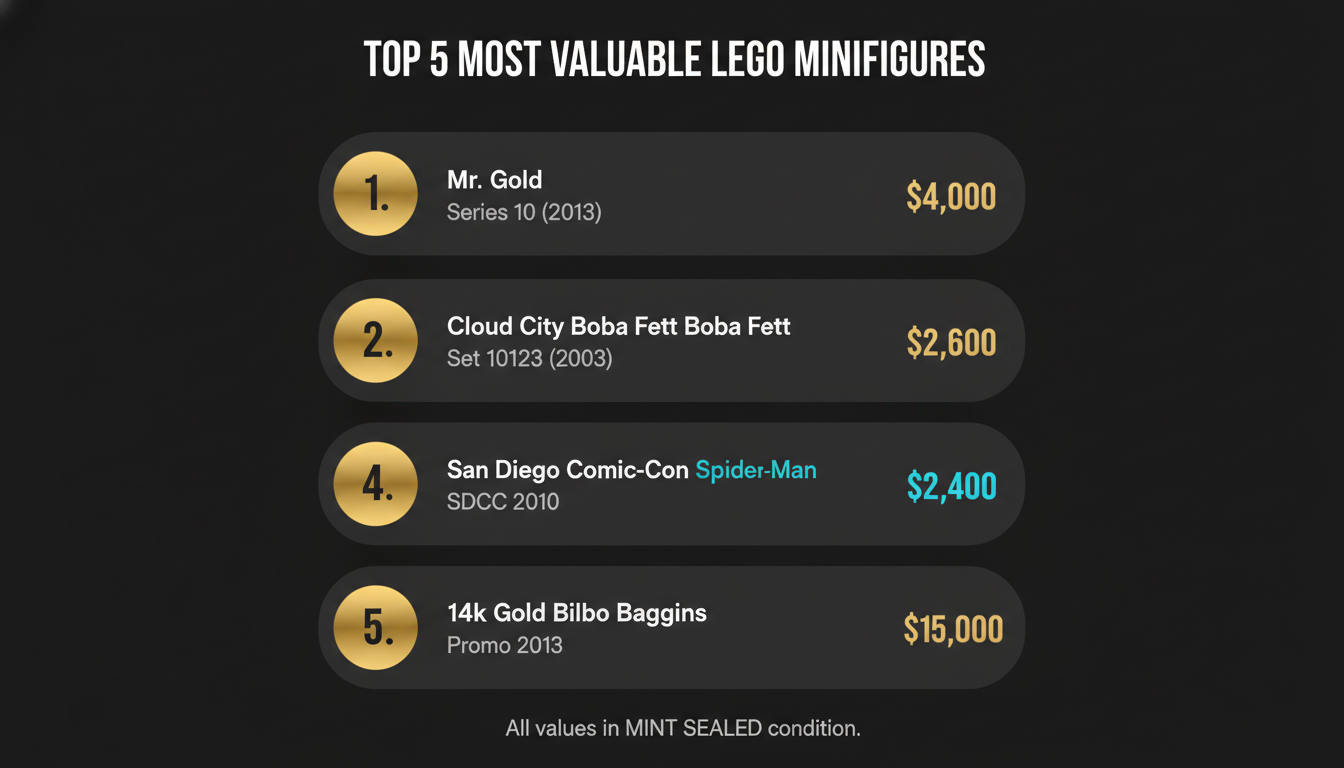
Prices are mint-sealed-condition median sold listings on BrickLink, eBay, and Brick Ranker for the last 90 days (May 2026).
| Rank | Minifig | Source | Sealed value |
|------|---------|--------|--------------|
| 1 | 14k Solid Gold Bilbo Baggins | LEGO promo, 2013 | ~$15,000 |
| 2 | Mr. Gold | Series 10 (2013), 1-in-5,000 | ~$4,000 |
| 3 | SDCC Cloud City Boba Fett (with blaster) | Set 10123, 2003 | ~$2,600 |
| 4 | George Lucas (never publicly released) | Internal LEGO gift, 2010 | ~$2,697 |
| 5 | SDCC 2010 Boba Fett (white prototype) | SDCC exclusive, 2010 | ~$2,400 |
A few things worth understanding about this leaderboard:
The Bilbo Baggins at #1 is a 14k solid gold one-of-five promotional figure given out at a 2013 promotional event. It's not really comparable to the others — it's a luxury collectible, not a typical CMF. Treat it as the asterisk at the top of the chart.
Mr. Gold (Series 10, 2013) is the canonical "scanner pays for itself" story. Only 5,000 were produced — a deliberately scarce chase figure. If you scanned a Series 10 bag in 2013 and found Mr. Gold, you walked out with a $5 polybag that's now a $4,000 figure. That's an 80,000% nominal return over 13 years, or roughly 65% compound annual growth. Better than any LEGO set on record.
The Cloud City Boba Fett (Set 10123, 2003) is the most-asked-about Star Wars minifig. Two printing variants exist: the more common "plain limbs" version (~$1,400 sealed) and the rarer "printed arms and printed legs" version (~$2,600 sealed). The variant matters more than any other factor — an AI scanner that doesn't differentiate is giving you a value range of $1,400 to $2,600, which is useless for sale decisions.
George Lucas at #4 is the wild card. Never publicly released; LEGO gave a small number to Lucas himself and to staff at his studio. Sales are rare and the value depends entirely on the buyer that day.
If you want to see the full top-100 ranking with live last-sold prices, [Brick Ranker's leaderboard](https://brickranker.com/rankings/minifigures) is the canonical source. They update weekly.
From scan to sale price — the 4-step workflow
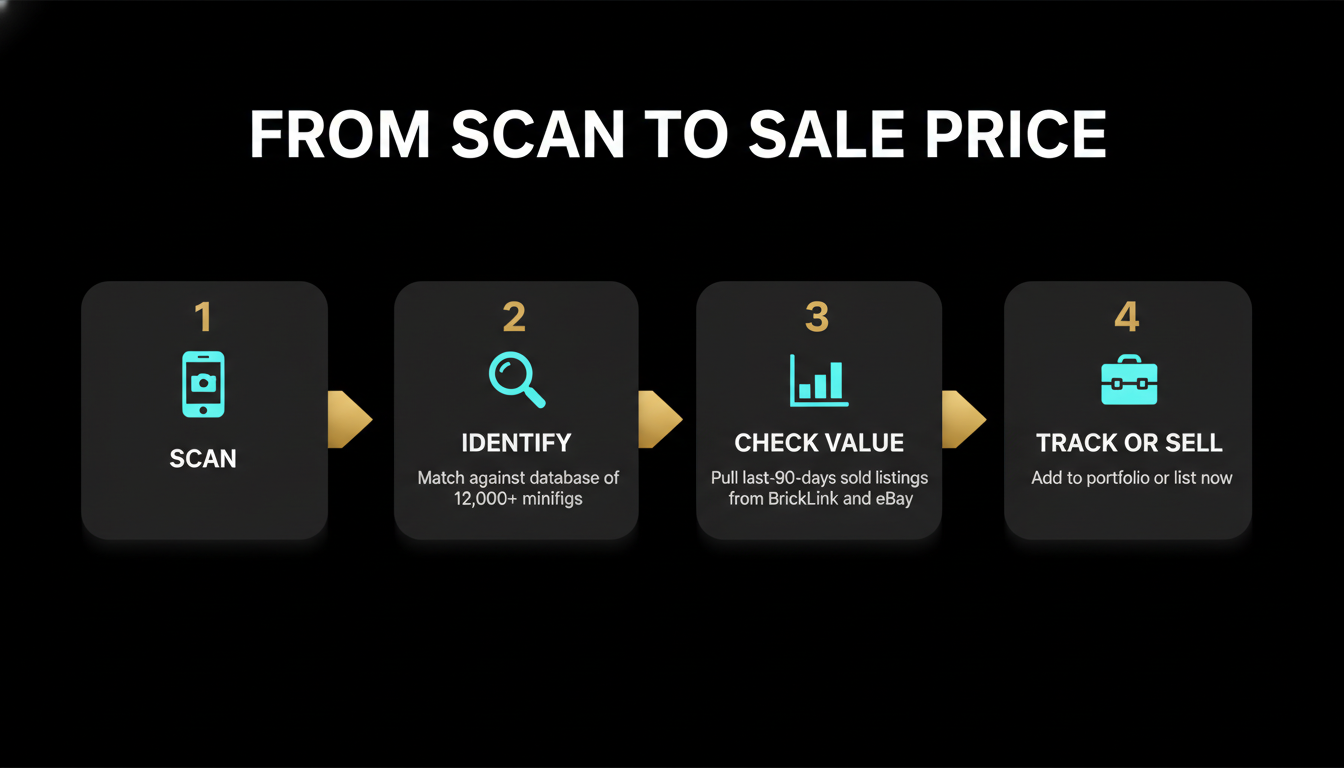
A scanner identifies a minifig. Selling for the right price is four more steps:
Step 1: Scan and confirm identity
Use a scanner app. If you're identifying an opened figure, cross-check with a second app — AI recognition is wrong 10–15% of the time on unusual figures. For high-value figures (anything you suspect is over $200), do a manual visual confirmation against the BrickLink catalog page for that figure before you proceed.
Step 2: Verify the variant
This is the step the scanners can't do reliably. Once you know the figure name, search BrickLink for that name and read the variant list. Note the exact printing details: arm print yes/no, leg print yes/no, face print version (some figures had 2-faced redesigns), accessory completeness. Match yours to the right variant. The value table on BrickLink lists each variant separately.
Step 3: Pull a real market value
Don't use "for sale" prices. They're aspirational and often 30% above what the figure actually sold for. Use the BrickLink Price Guide tab on the catalog page — specifically the "Last 6 Months — Sold" view. That shows median, low, and high of actually-completed sales. Cross-check on Rebrickable (which pulls eBay and BrickLink sold data) for a second opinion. For figures over $500, also check Brick Ranker for trend direction (rising vs declining).
Step 4: Net out the fees
The price you see is gross. The price you receive is roughly 84% of that on eBay (13% final-value fee + 3% PayPal), minus shipping. On a $200 minifig in a small bubble mailer, you'll net around $165 after a $7 shipping outlay. On a $2,000 sealed Boba Fett requiring insured shipping ($30) plus eBay fees, you net closer to $1,650 — a 17.5% reduction from the headline price. Always price your "is it worth selling" decision against the net, not the gross.
What BrickLens does differently
We didn't build a minifigure scanner. The category is well-served by the free apps above for blind-bag work and by Brickify / Instabrick for AI image recognition. Building a duplicate would be a worse experience than just recommending the right tool for the job.
What we did build is the part of the workflow that nobody else does end-to-end: scan an entire set (UPC barcode on the box), see live BrickLink + eBay + BrickOwl prices for the set and its minifigs combined, add it to a portfolio that tracks per-set ROI against your basis, and set price alerts on the minifigs separately so you know when a market dip hits a target you've pre-decided. That's the [BrickLens iOS app](/) — built for collectors who treat the collection as a portfolio rather than a list.
If you're using one of the minifig scanners above and want to extend the workflow into long-term portfolio tracking — including the minifigs as line items inside their parent sets — that's where we fit. Set ROI projections grounded in [HSE tier multipliers](/blog/is-lego-a-good-investment) ([Star Wars UCS 17.6%, Modular Buildings 15.4%, Ideas 14.3%](/blog/lego-appreciation-rate)), portfolio-level alerts on net-of-fees price movement, and a properly-built [investment calculator](/tools/investment-calculator) to project forward returns.
Bottom line
If you collect Collectible Minifigures and want to skip the duplicate fishermen, install Minifig Scan or use Jay's Brick Blog scanner in your browser. Free, works in seconds, no excuses.
If you've inherited a bin of mixed minifigs and need to triage what's valuable, pay for Brickify ($30/year) or Instabrick. AI recognition isn't perfect but it beats two days of manual BrickLink searching.
If you find a Mr. Gold, a Cloud City Boba Fett, or anything else over $500: stop, do the 4-step workflow properly, verify the variant manually, pull last-6-months sold data, and account for fees. The difference between a quick eBay flip and a careful sale on a high-value figure can be 30% of the proceeds.
And once you know what each minifig in your collection is worth, the next decision is portfolio-level: hold sealed for the long-run scarcity curve, sell into a hot IP cycle, or rebalance away from theme concentration. That's what we wrote the [LEGO portfolio tracker playbook](/blog/lego-portfolio-tracker) for. The [collection value calculator](/tools/collection-calculator) is the fastest way to get from "I have 200 minifigs" to a single net-of-fees portfolio number.
Related reading: [most valuable LEGO sets of all time](/blog/most-valuable-lego-sets), [the LEGO portfolio tracker playbook](/blog/lego-portfolio-tracker), [the real LEGO appreciation rate](/blog/lego-appreciation-rate).